(Updated) Microsoft Viva: Copilot Analytics - Agent 365 Dashboard in Insights
AI summary
Expanded Agent Dashboard shows Agent 365 data across four analytics pages
Agent 365-Dashboard erweitert auf vier Seiten mit zusätzlichen Agent-Typen
Rollout dates
- Standard release (GA): –
Extracted from the announcement text; the Microsoft text is authoritative.
Impact
ChangeCockpit assessment (admin, user and compliance impact).
Microsoft announcement
Updated July 28, 2026: We have updated the content. Thank you for your patience.
[What and Why:]
We're expanding the Agent Dashboard in Microsoft Insights (Copilot Analytics) to include Agent 365 data. Organizations with Agent 365 licenses will now be able to view adoption insights across a broader set of agents in their organization. By bringing Agent 365 activity and richer agent details into one view, leaders get a single, consolidated picture of the agents running in their organization, along with context on who built each agent and why. Agent 365 insights will be available across the Overview, Adoption, Returning Users, and agent deep-dive pages.
[Rollout Schedule:]
- General Availability (Worldwide): Begins rolling out late July 2026.
[Impact on Your Organization:]
Who is affected:
- Leaders, delegates, adoption specialists, and administrators using the Agent Dashboard in Microsoft Insights (Copilot Analytics).
- Organizations with Agent 365 licenses assigned.
Platforms/Services:
- Web
What will happen:
- Customers with Agent 365 licenses will be able to see Agent 365 adoption and engagement data within the Agent Dashboard, alongside existing agent insights. Coverage spans agents built by employees or published by your organization, Microsoft, or third parties.
- The Agent Dashboard will surface Agent 365 insights across its pages, including:
- An Overview of the agent landscape — the top agents in your organization, who's driving adoption, and the creator types behind these agents.
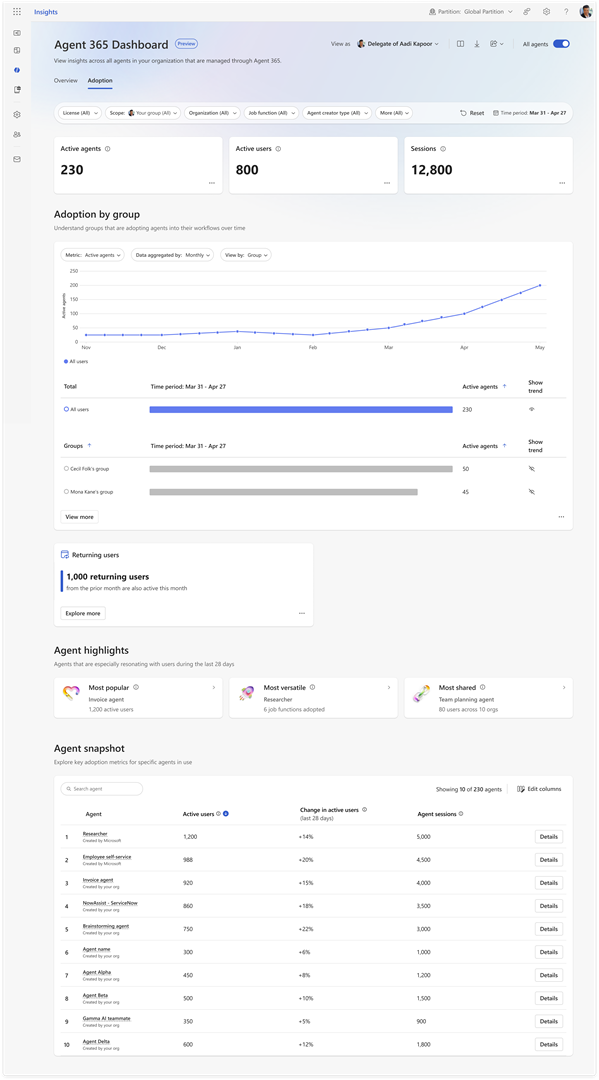
- Key adoption metrics such as the number of active agents, active users, and agent sessions, with organizational filters and breakdowns — including creator type and source — to pinpoint the agents employees engage with most.
Screenshot 2: Adoption page:
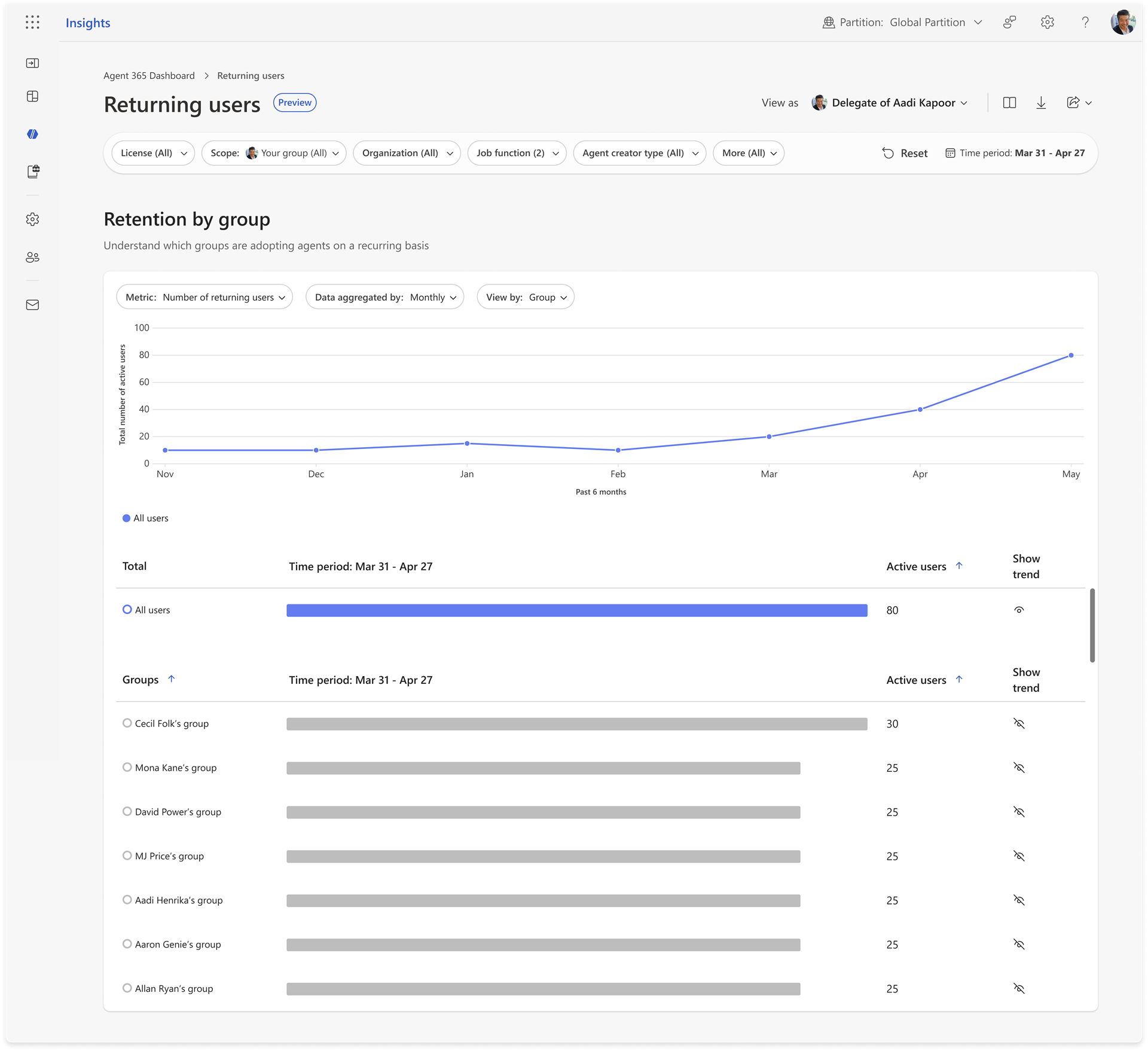
- The Returning Users page will provide weekly and monthly retention trends, including group-level comparisons to help identify sustained adoption patterns and training opportunities.
Screenshot 3: Returning Users page:
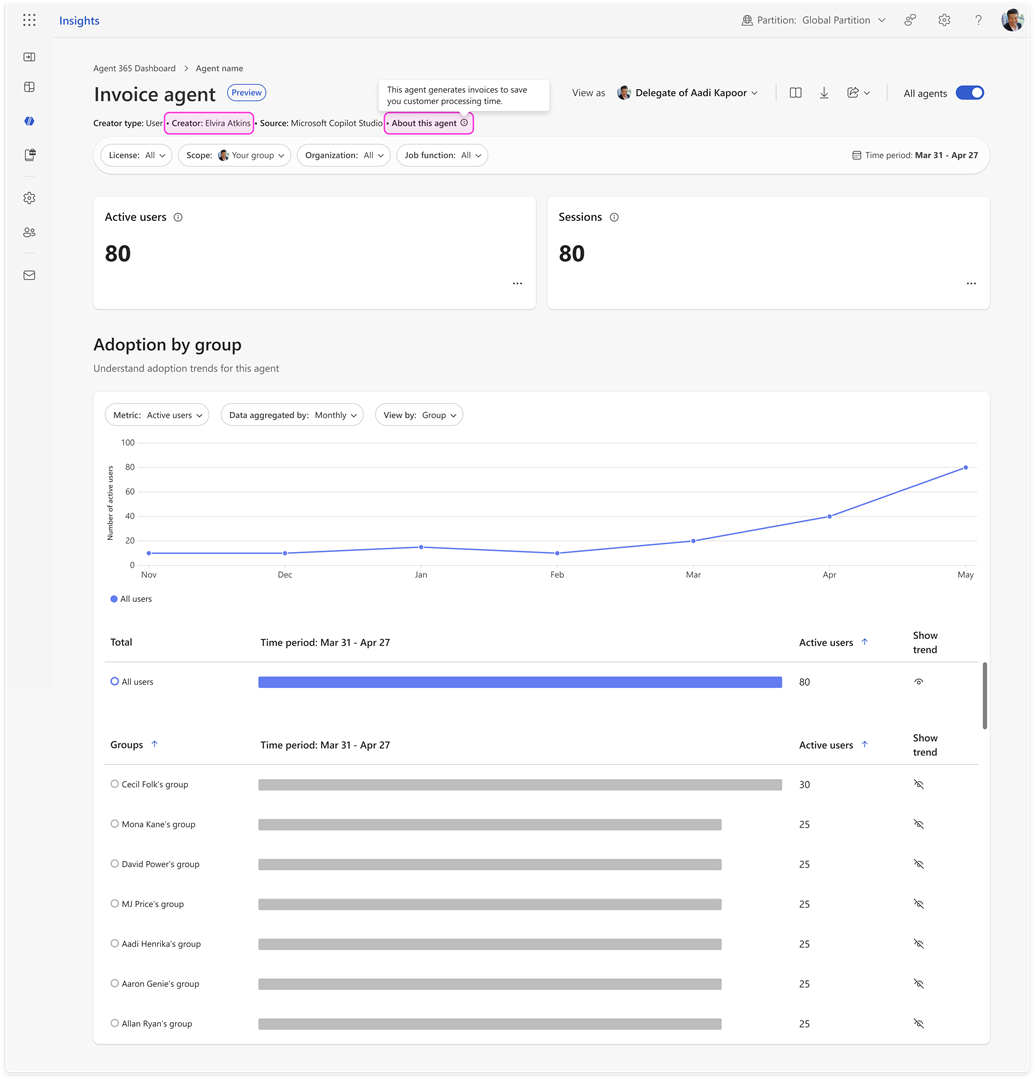
- The ability to deep-dive into a specific agent to understand its usage trends and the groups driving adoption. For user-created agents, the creator name and description surface right in the header.
Screenshot 4: Agent deep-dive experience:
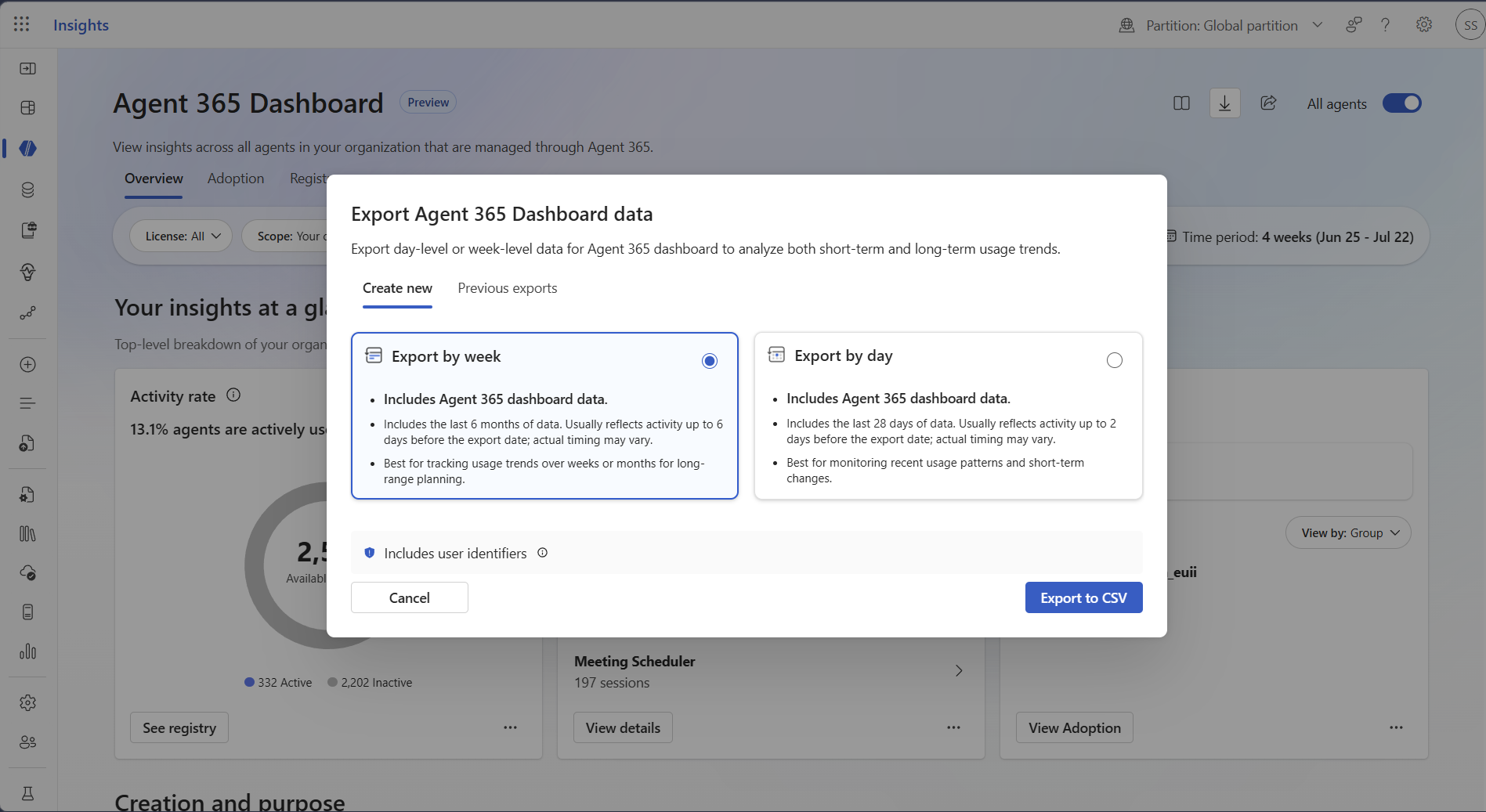
Screenshot 5: Export experience:
Screenshot 1: Overview page:
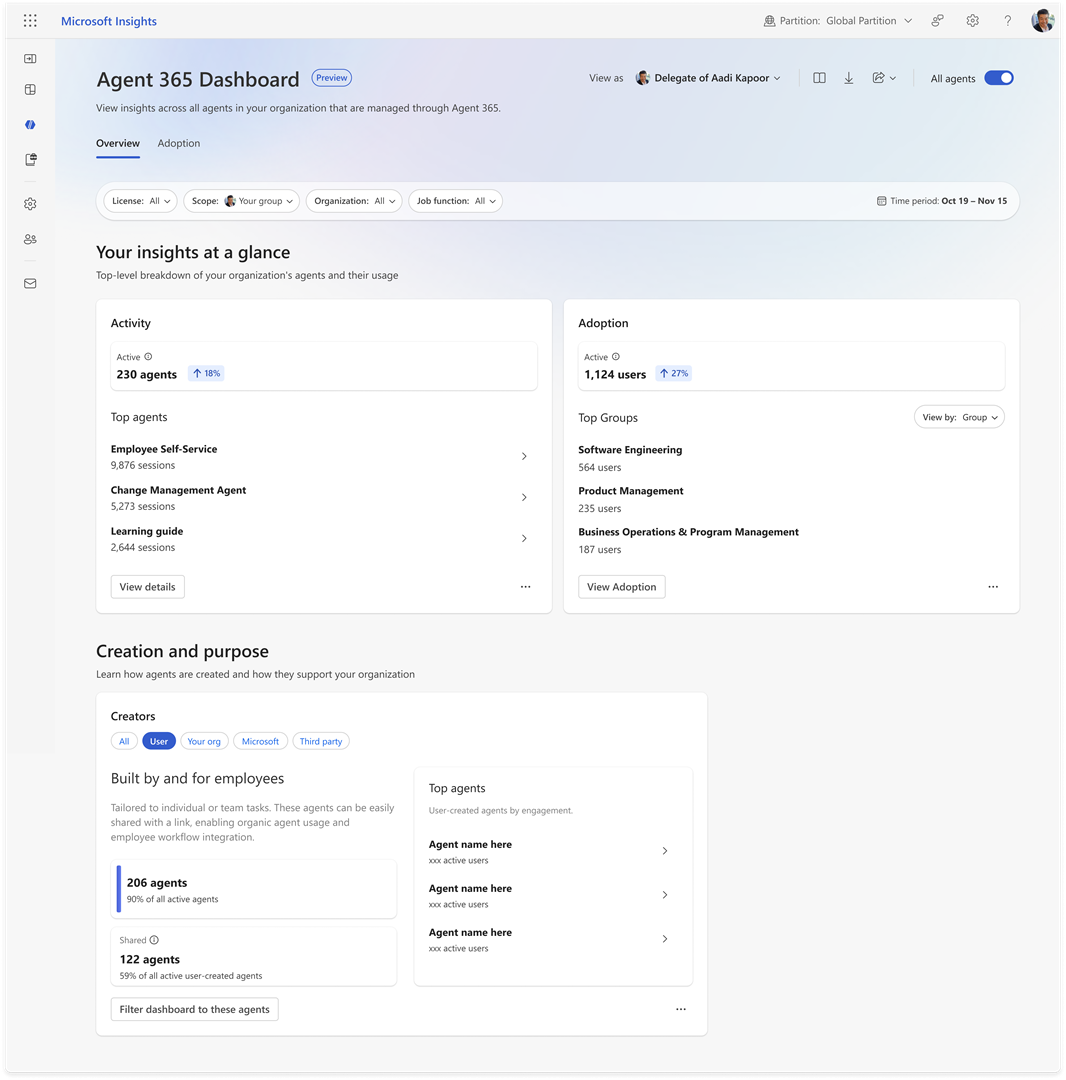
- Access to Agent 365 data in the Agent Dashboard follows the same requirements as Agent 365 licensing and the Copilot Dashboard. To see Agent 365 data, a tenant must have at least 50 Microsoft 365 Copilot licenses assigned, Agent 365 licenses assigned, and agent activity present.
- For agent activity insights to be shown, the minimum group size threshold must still be met.
[Action Required/Recommendations:]
- Review and assess the impact for your organization.
- Your organization can manage access to the Agent Dashboard through its own VFAM controls at a user, group, and tenant level, nested under the Microsoft Insights web app VFAM controls. These same controls govern access to Agent 365 data in the dashboard.
- You might consider reviewing with your works council and updating internal training and documentation as appropriate.
- Additional details will be available on Microsoft Learn once this functionality is released: Agent Dashboard — Microsoft Learn.
- Your organization can also manage which agents are visible in Agent 365 Dashboard reporting at a user, group, and tenant level – specifically, whether all agents are included (e.g., inclusive of all agents created by your org and end users), or only public agents such as Microsoft and third party agents are included. By default, all agents will be visible in reporting. This control will be available first for tenants by late July, with the option to manage at a user and group-level in early August.
[Compliance considerations:]
| Compliance Area | Explanation |
|---|---|
| Monitoring and reporting | This change adds Agent 365 data to existing Agent Dashboard surfaces. Agent activity insights continue to respect the minimum group size threshold. |
| Admin controls | No changes to existing Viva Insights VFAM controls. Access to Agent 365 data and export is governed by the same user/group/tenant VFAM controls as the rest of the Agent Dashboard. |
Change history
- 2026-07-29 · Updated · BodyContent
- 2026-07-29 · Updated · Details
- 2026-07-15 · Updated · Title
- 2026-07-15 · Updated · BodyContent
- 2026-07-15 · Updated · Tags
- 2026-07-15 · Updated · Details
- 2026-07-15 · Created · All