Microsoft Teams: Action required to allow Teams virtual channels in your Citrix environment for SlimCore optimization
Microsoft announcement
[What and why]
Microsoft Teams introduced a new optimization architecture for Citrix VDI environments that provides improved performance, reliability, and media quality compared to the legacy WebRTC-based optimization. This architecture also enables capabilities such as Gallery view (3x3 and 7x7), Quality of Service (QoS), HID support, custom backgrounds, hardware acceleration, and 1080p video.
You are receiving this message because we detected that your Citrix environment is not configured to allow the custom virtual channels required for Teams SlimCore optimization. As a result, affected users are currently unable to use the newer optimization architecture and instead use the soon to be deprecated "Citrix HDX Media optimization" (WebRTC-based).
Microsoft previously announced the retirement of WebRTC-based optimization for Windows endpoints connecting to Citrix environments in MC1239928. WebRTC-based optimization will be unsupported beginning October 1, 2026, and will stop working on April 1, 2027. We recommend remediating affected Citrix environments as soon as possible.
[Rollout schedule]
- End of Support dialogue rollout began in late July 2026 and expected to complete by late October 2026
[Impact on your organization]
Who is affected
Administrators and users in Microsoft 365 tenants where Microsoft has detected Citrix DaaS or Citrix Virtual Apps and Desktops (CVAD) environments that do not permit the Teams custom virtual channels required for SlimCore optimization
Platforms and services
- Microsoft Teams
- Citrix DaaS
- Citrix Virtual Apps and Desktops (CVAD)
What will happen
- Teams users in affected Citrix environments are not be able to use SlimCore optimization.
- Teams will continue to use the legacy WebRTC-based optimization path.
- With Citrix Virtual Apps and Desktops 2603 and later, the Virtual Channel Allow List policy is enabled by default and no action is required for that VDA version
- By default, in VDAs that are older than 2603, the Citrix Studio policy may block the Teams custom virtual channels unless Teams is explicitly added to the allow list.
[Action required and recommendations]
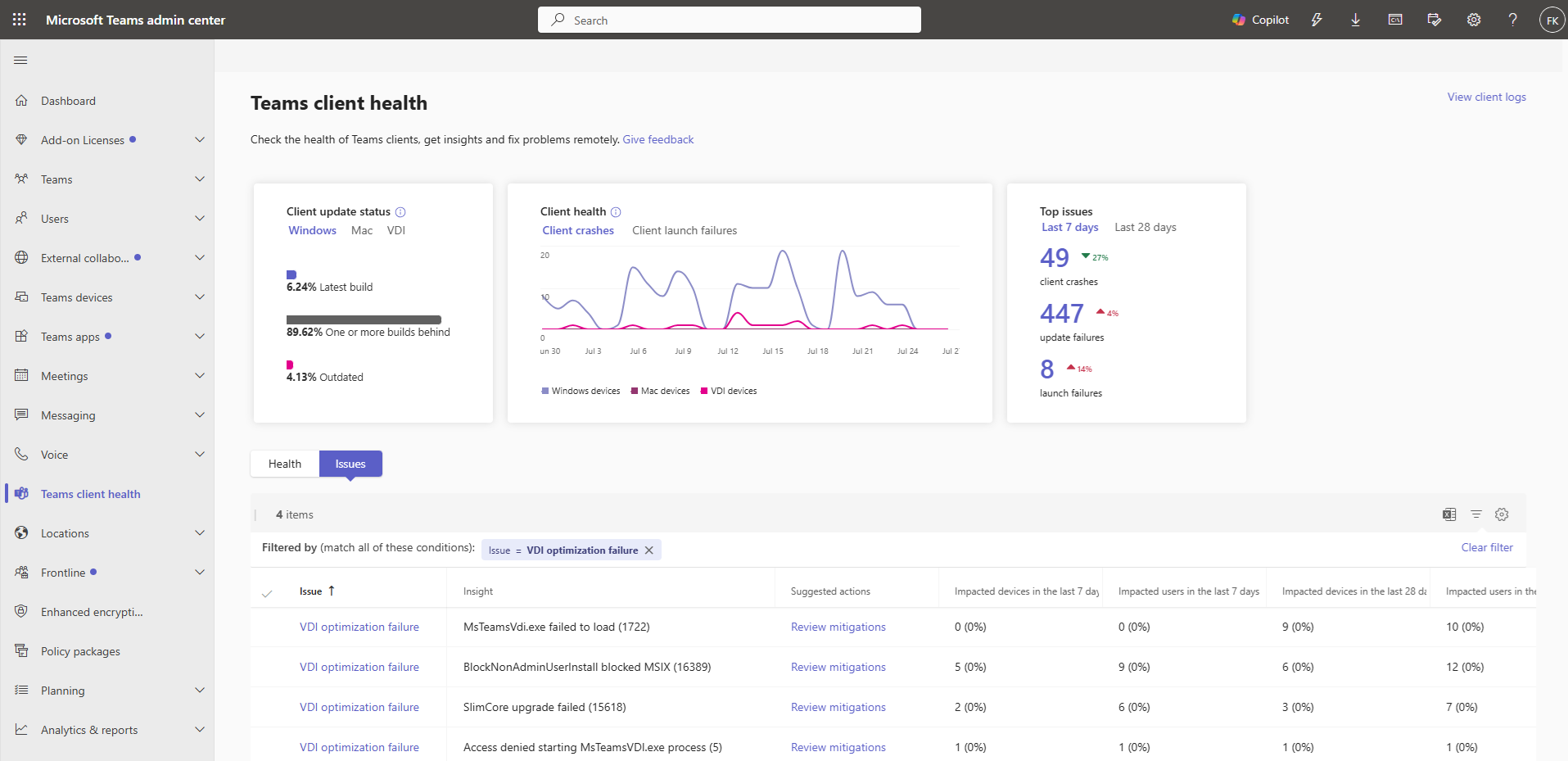
Use the Teams Client Health experience in the Teams admin center to identify affected users. Error code 2003 indicates that Teams virtual channels are not allowed.
[Image: Teams Client Health showing error code 2003 for virtual channel configuration issues:
There are two supported remediation options.
Option A: Update the Citrix Studio policy
(Supported on VDA version 2203 CU2 and later)
- Review and update the Citrix Virtual Channel Allow List policy.
- Add the following custom Teams virtual channels and map each entry to the Teams executable:
- MSTEAMS → C:\Program Files\WindowsApps\MSTeams*8wekyb3d8bbwe\ms-teams.exe
- MSTEAM1 → C:\Program Files\WindowsApps\MSTeams*8wekyb3d8bbwe\ms-teams.exe
- MSTEAM2 → C:\Program Files\WindowsApps\MSTeams*8wekyb3d8bbwe\ms-teams.exe
- Wildcard support requires:
- VDA 2206 CR or later, or
- VDA 2203 LTSR CU2 or later
- Reboot VDA machines after updating the policy.
Option B: Upgrade the VDA
- Upgrade to VDA 2603 or later.
- VDA 2603 and later allow the three Teams virtual channels by default and do not require Citrix Studio policy configuration.
For both options:
- Ensure the Citrix Teams plugin is deployed alongside the Citrix Workspace app.
- Verify that the endpoint is configured according to Microsoft's Teams VDI guidance.
- Before making changes, review the Teams VDI deployment and configuration information in New VDI solution for Teams | Microsoft Teams | Microsoft Learn.
Learn more
- Citrix virtual channel allow list - New VDI solution for Teams | Microsoft Teams | Microsoft Learn
- Step 2: Plugin installation on the endpoint - New VDI solution for Teams | Microsoft Teams | Microsoft Learn
[Compliance considerations]
No compliance considerations identified. Review as appropriate for your organization.
Change history
- 2026-08-05 · Created · All