Microsoft Copilot: Introducing the Microsoft plugin registry for Microsoft Copilot experiences
AI summary
Plugin registry replaces agent management in Copilot
Plugin-Katalog ersetzt Agenten-Management in Copilot
Rollout dates
- Standard release (GA): –
Extracted from the announcement text; the Microsoft text is authoritative.
Impact
ChangeCockpit assessment (admin, user and compliance impact).
Microsoft announcement
[What and why]
We are introducing the Microsoft plugin registry to Microsoft Copilot experiences. The Microsoft plugin registry provides a shared catalog for discovering, publishing, and governing organization-approved and custom-built plugins across Microsoft Copilot experiences (Chat, Cowork, Code, Autopilot) and Microsoft 365 apps (Word, PowerPoint, Excel) and SharePoint. Plugins can bundle agents, skills, connectors, and Model Context Protocol (MCP) servers into a single package that can be published, discovered, governed, and acquired through the Microsoft 365 admin center and Microsoft Agent 365.
As part of this update, the Agents, Agents & Skills, and Customize buttons will be replaced by a new Plugins button. This change reduces the need to repeat discovery and setup processes by providing users with a more consistent way to discover and access approved plugins across supported Copilot experiences. Admins will continue to manage agents in the Agents settings within the Microsoft 365 admin center and Microsoft Agent 365.
[Rollout schedule]
- General Availability (Worldwide): This change consists of two rollouts:
- Plugin registry: Rollout began in late September 2026 and is expected to complete by late October 2026.
- User interface changes: Rollout begins in late October 2026 and is expected to complete by late November 2026.
[Impact on your organization]
Who is affected
- Microsoft 365 admins who manage plugins and users who access agents, skills, connectors, or MCP servers through supported Microsoft Copilot experiences.
Platforms and services
- Microsoft Copilot Chat
- Microsoft Copilot Cowork
- Microsoft Copilot Code
- Microsoft Copilot Autopilot
- Microsoft Word
- Microsoft PowerPoint
- Microsoft Excel
- Microsoft SharePoint
- Microsoft 365 admin center
- Microsoft Agent 365
What will happen
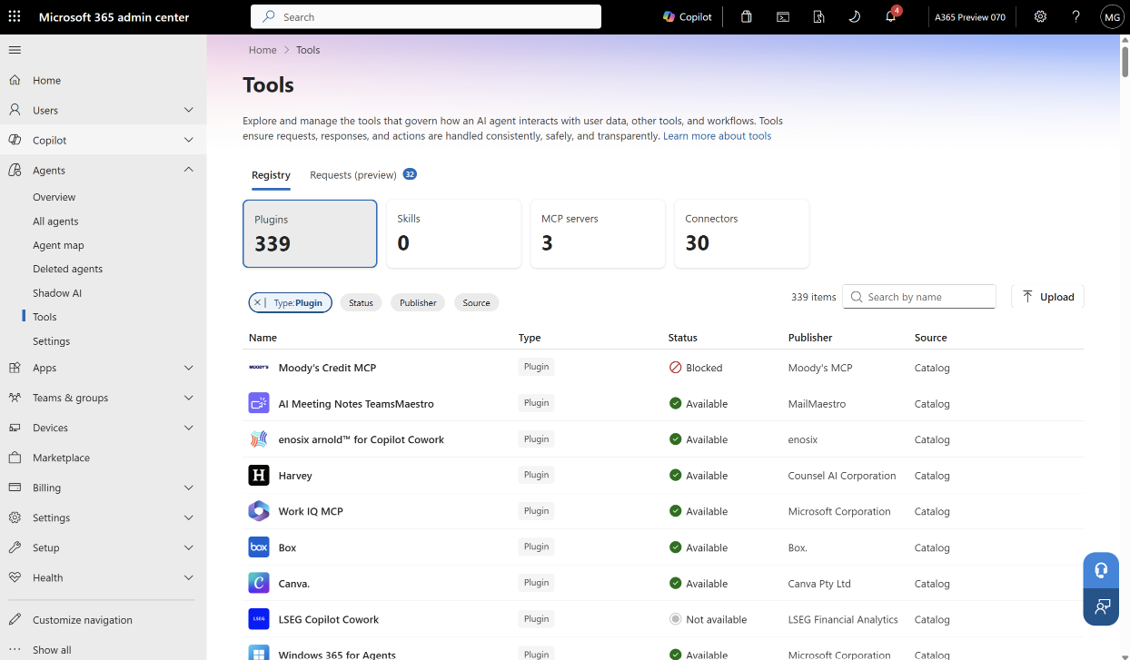
- Microsoft 365 admins will be able to discover, publish, govern, and manage plugins centrally under Tools in the Microsoft 365 admin center and Microsoft Agent 365.
- Users will be able to access approved plugins through a more consistent experience, reducing the need to repeat discovery and setup processes across supported Copilot experiences.
- By late November 2026, users will select Plugins instead of Agents, Agents & Skills, or Customize to find agents.
Updated Tools menu in the Microsoft 365 admin center
[Action required and recommendations]
No action or setup is required to enable this change, and no technical migration is required. We recommend that you:
- Update internal documentation, training, and adoption materials that reference Agents, Agents & Skills, or Customize.
- Prepare users for the Agents, Agents & Skills, and Customize buttons to be replaced by the new Plugins button.
- Review which plugin capabilities should be available to users based on your organization’s governance requirements.
[Learn more]
- Extend Microsoft 365 Copilot | Microsoft Learn
- Manage plugins, skills, and MCP servers in Microsoft 365 admin center - Microsoft 365 admin | Microsoft Learn
- Agent settings in Microsoft 365 admin center - Microsoft 365 admin | Microsoft Learn
[Compliance considerations]
No compliance considerations identified. Review as appropriate for your organization.
Change history
- 2026-10-01 · Created · All