Copilot Code is rolling out in Frontier
AI summary
Copilot Code deploys to Frontier users on managed runtime with consumption-based licensing
Copilot Code roll-out für Frontier-Programm mit Cloud-Runtime und Nutzungsbasiertem Rechnungswesen
Rollout dates
- Standard release (GA):
- Frontier:
Extracted from the announcement text; the Microsoft text is authoritative.
Impact
ChangeCockpit assessment (admin, user and compliance impact).
Microsoft announcement
[What and Why:]
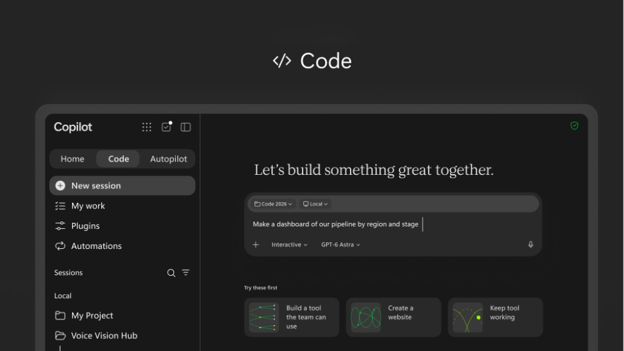
Copilot Code is an AI-powered coding experience in Microsoft Copilot that helps people turn ideas into trackers, dashboards, apps, and other solutions using natural language. Work IQ grounds what they build in emails, meetings, documents, chats, and connected data.
People closest to a problem can build the solution they need while your organization maintains control. Published apps run on Copilot Managed Runtime and inherit your organization’s governance, security, and management controls.
[Rollout Schedule:]
- Copilot Code: Begins with the Frontier program in late October 2026.
[Impact on Your Organization:]
Who is affected:
- Users in the Frontier program who have a Microsoft 365 Copilot license and are enabled for usage-based billing.
- Microsoft 365 admins who manage the Copilot app, spending policies, and usage-based billing.
Platforms/Services:
- Microsoft Copilot app on Windows
- Microsoft Copilot on the web
- Microsoft 365 admin center
- Copilot Managed Runtime
- Work IQ
- GitHub, when enabled
What users can do with Copilot Code
- Users access Code from the Copilot app navigation pane and describe what they want to build. Copilot can ask clarifying questions and use their work context to build the solution.
- Users can refine what they build through conversation or direct edits. On PC, when local coding is enabled, users can also work with local files and tools or use the terminal.
- Users can publish projects to Copilot Managed Runtime, a Microsoft-managed cloud environment, and share them with others in their organization. Access to underlying data continues to depend on the user's permissions.
- Users can connect Code to GitHub when the connection is enabled by an admin.
How admin settings control access
Copilot Code uses usage-based billing. To use Copilot Code, users need:
- A Microsoft 365 Copilot license.
- A spending policy.
By default:
- Cloud coding sessions are enabled on web and PC for eligible users with a Copilot spending policy.
- Local coding sessions are disabled by default. Admins can allow local coding on PC by setting Code execution location to Cloud and local in the Microsoft 365 admin center.
- Users covered by a spending policy where the setting "Allow new Agents and services as they become available" is enabled automatically receive access to Code through that spending policy.
For more information about Allow new agents and services setting, see MC1470425.
The following settings determine what users see and can use:
| Code spending policy | Allow users to discover and use AI experiences enabled by usage-based billing | Code execution location | What users see |
| Assigned | No effect | Cloud (default) | Code with cloud coding sessions |
| Assigned | No effect | Cloud and local | Code with cloud coding sessions and local coding sessions on PC |
| Not assigned | On | No effect | Code entry point and welcome page; Code cannot be used |
| Not assigned | Off | No effect | Code entry point is hidden |
[Action Required/Recommendations:]
Action is required if you want eligible users to use Copilot Code.
- Review the Copilot Code blog.
- Deploy the unified Microsoft Copilot app.
- For Windows devices participating in Frontier, set the Microsoft Copilot target channel to Beta.
- Review your spending policies and confirm that Code is included for the users who should have access. If automatic access to new usage-based services is enabled, review which users will automatically receive Code through their existing spending policy.
- Enable Copilot Credit consumption and configure the appropriate spending policies in the Microsoft 365 admin center under Copilot > Cost management.
- Decide whether users should have cloud-only coding or cloud and local coding. Local coding is off by default.
- Prepare your help desk for the new Code experience, including the in-product experience and your organization's access-request process.
- Review information about Copilot Managed Runtime.
- Review the Frontier program requirements and guidance.
Resources
- Copilot Code blog
- Get started with Copilot Code
- Deploy the unified Microsoft Copilot application | Microsoft Learn
- Microsoft Copilot update policies for Windows | Microsoft Learn
- Copilot Managed Runtime blog
- Get started with the Frontier program
[Compliance considerations:]
| Stores new customer data | Users can create projects/apps and publish them to Copilot Managed Runtime. |
| Changes how existing customer data is accessed or processed | Code can use Work IQ, including emails, meetings, documents, chats, and connected data, to ground what users build. |
| Introduces new user interaction with organizational data | Apps built with Code can use organizational context, and published apps may be shared with others in the organization subject to underlying data permissions. |
| Introduces external/third-party integration | GitHub can optionally be connected when enabled by an admin. |
| Introduces admin-controlled usage-based billing | Code uses usage-based billing and requires the applicable spending policy for users to use the experience. |
| Introduces local execution/data interaction | Admins can optionally enable local coding sessions on PC, allowing users to work with local files and tools. |
Change history
- 2026-10-21 · Created · All